
ETH DVT Staking via API
This guide outlines the complete workflow for institutional custodians to stake ETH, manage validators, and handle edge cases (refunds) using the ContributionDAO API. The process is designed with security in mind, ensuring that private keys never leave your secure environment (HSM/MPC).
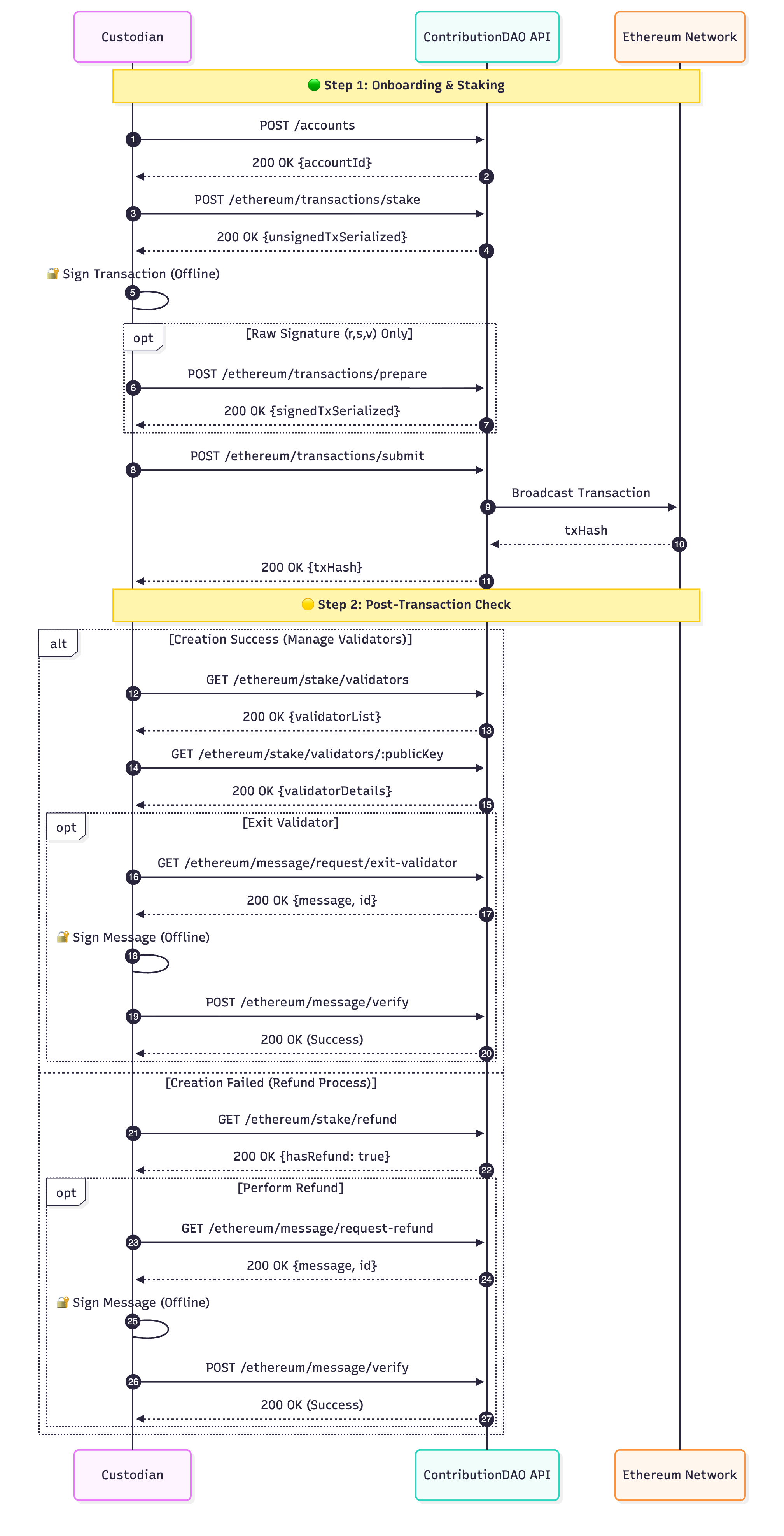
Integration Workflow Diagram
The following sequence diagram illustrates the interaction between the Custodian, ContributionDAO API, and the Ethereum Network.
Step-by-Step Implementation
Step 1: Staking (Create Validators)
1.Create Account
- Endpoint: POST /accounts
- Register your organization/account to obtain an accountId.
2.Generate Unsigned Transaction
- Endpoint:
POST /ethereum/transactions/stake - Input: Provide the
amount(multiple of 32 ETH),walletAddress(funding source), andwithdrawalAddress. - Output: The API returns an
unsignedTxSerialized. - Security Check: Decode this payload locally to verify the
eth2WithdrawalCredentialsmatch your intended withdrawal address.
3.Sign Transaction
- Sign the payload using your HSM or MPC environment. Produces raw r, s, v components, proceed to Step 4.
4.Reconstruct Transaction
- Endpoint:
POST /ethereum/transactions/prepare - Use this helper endpoint only if you possess raw signature components (
r,s,v). The API will reconstruct the valid RLP-encoded signed transaction for you.
5.Submit Transaction
- Endpoint:
POST /ethereum/transactions/submit - Send the final
signedTxSerializedto broadcast it to the Ethereum network.
Step 2: Post-Transaction Check & Management
Once the transaction has been broadcast to the Ethereum network, the workflow splits based on the result of the validator creation: Success (Manage Validators) or Failure (Refund Process).
A. Creation Success (Manage Validators)
If the staking transaction is confirmed, you can view and manage your validators.
1. Retrieve Validator List
- Endpoint:
GET /ethereum/stake/validators - Output: A list of all validators associated with the account.
2. Get Validator Details
- Endpoint:
GET /ethereum/stake/validators/:publicKey - Output: Specific details including status and performance metrics.
3. Exit Validator (Optional)
To withdraw your stake, you must complete a cryptographic signature verification.
- Request Exit Message
- Endpoint:
GET /ethereum/message/request/request-exit-validator - Output: A
messagestring and a uniqueid.
- Endpoint:
- Sign Message (Offline)
- Sign the received message using your key.
- Verify & Execute
- Endpoint:
POST /ethereum/message/verify - Input: Signed signature and the
id. - Output:
200 OK(Trigger exit process).
- Endpoint:
B. Creation Failed (Refund Process)
If the validator creation fails on-chain, you must check for and claim any refundable assets
1. Check Refund Status
- Endpoint:
GET /ethereum/stake/refund - Output:
{ hasRefund: true }if funds are available.
2. Perform Refund
To authorize the return of funds, verification is required.
- Request Refund Message
- Endpoint:
GET /ethereum/message/request-refund - Output: A
messagestring and a uniqueid.
- Endpoint:
- Sign Message (Offline)
- Sign the received message using your key.
- Verify & Execute
- Endpoint:
POST /ethereum/message/verify - Input: Signed signature and the
id. - Output:
200 OK(Initiate refund transaction).
- Endpoint:
Updated 10 months ago